Documentation will follow soon.
This is the multi-page printable view of this section. Click here to print.
Documentation
1 - Documentation - Need-to-Know for Confluence
Documentation is evolving.
1.1 - Quick Start - Need-to-Know for Confluence
This article explains how to get started.
Not sure what this app is about? Read more here: Stop “Forever Access” and Automate Least Privilege.
Quick Start Video
This 15-minute video demonstrates the Need-to-Know for Confluence app and macro in action.
You’ll learn
- How to make a Confluence page a Need-to-Know Portal.
- How to configure and activate the portal.
- How usage metrics look like.
- How restrictions are automatically managed.
Quick Start Instructions (Based on the Quick Start Video)
Open a wiki page in Confluence Cloud and add the Need-to-Know macro to it, making this page a Need-to-Know Portal.
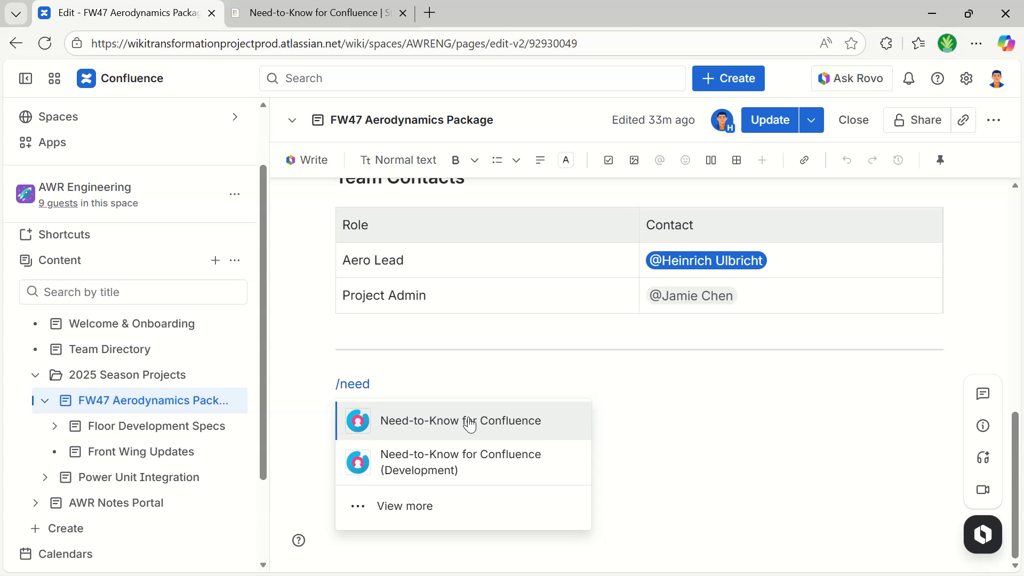
The guided setup is shown.
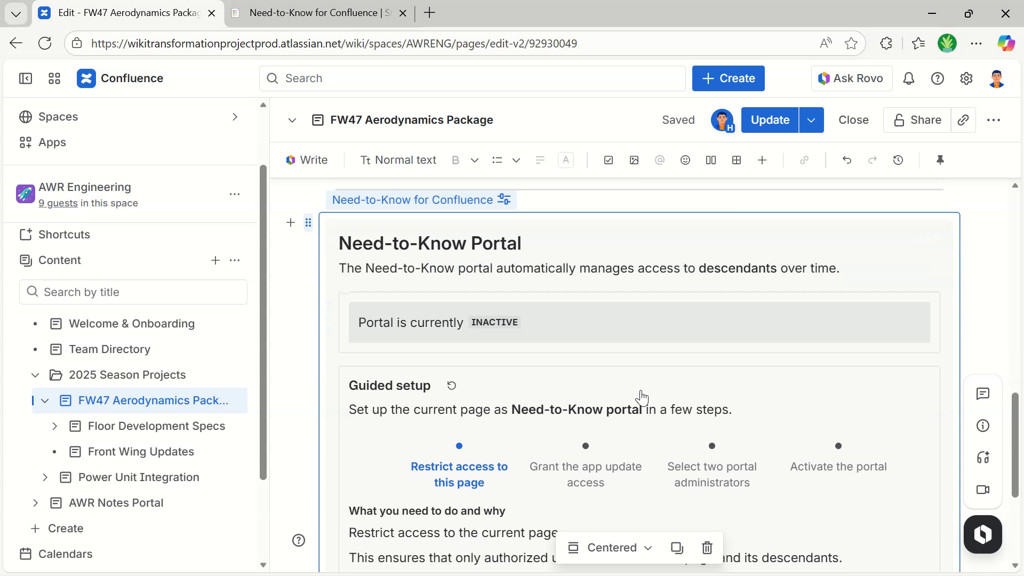
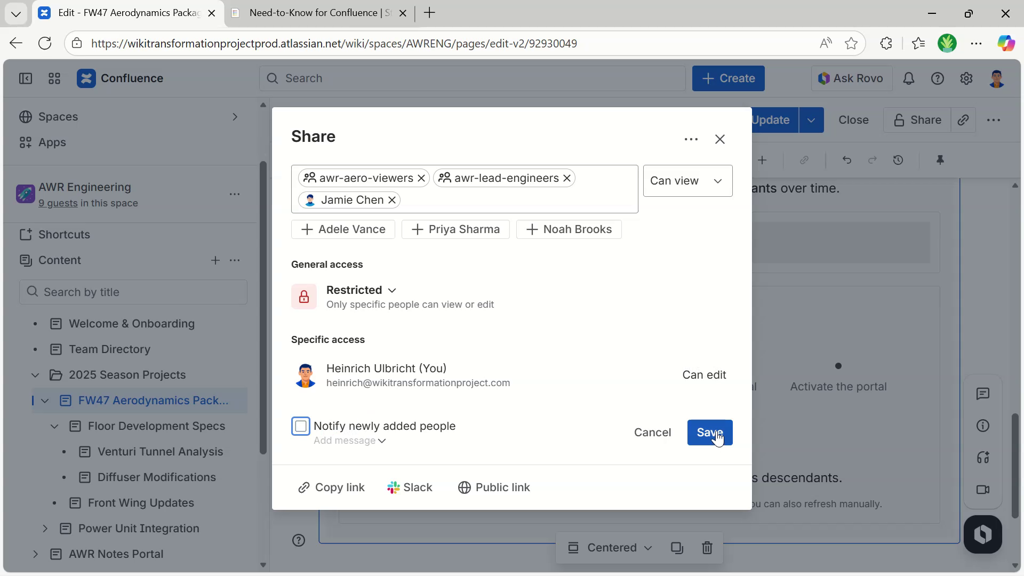
Continue by restricting access to the portal page.
Note: wait a minute, or click the reload button for the guided setup to detect the restrictions.
In the next step, set two portal administrators.

Right when choosing the second portal administrator, the portal activation toggle appears.
Activate the portal using the toggle.
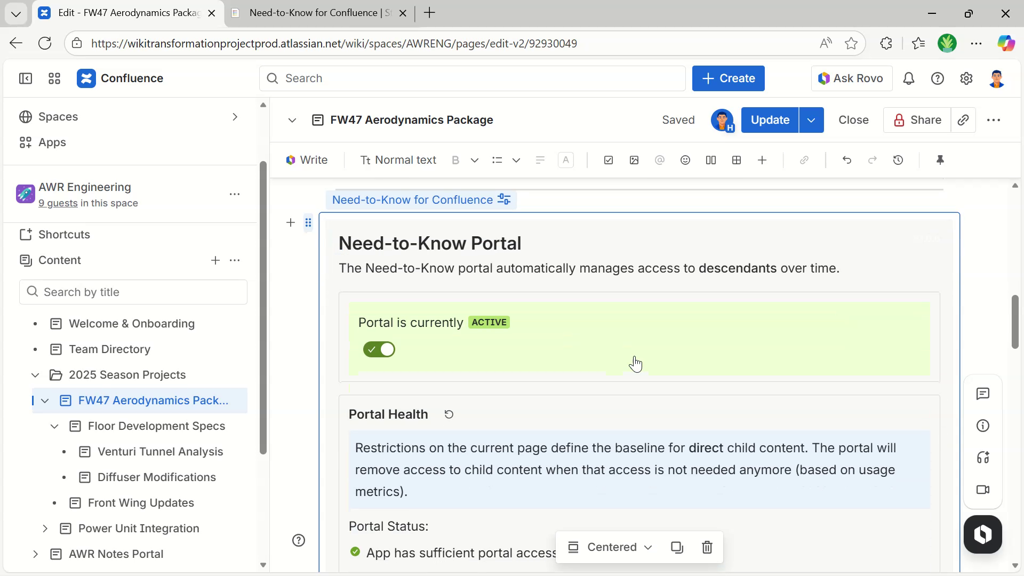
The portal will now start adopting its direct children, managing their restrictions.
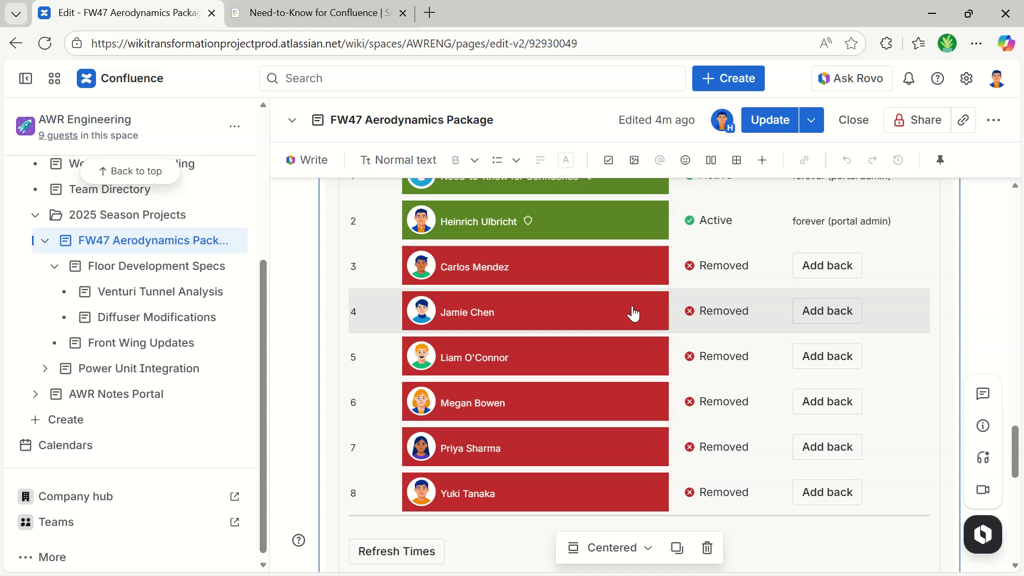
Refer to the quick start video in the previous section (starting at minute 4:20) for more insights into how restrictions are managed, metrics are shown, and how automatic restriction removal looks like.
1.2 - How Does It Work
This article explains how the Need-to-Know app enforces the need-to-know principle.
The Need-to-Know for Confluence app provides a macro that creates a Need-to-Know Portal when placed on a Confluence page.
We’ll call the Need-to-Know Portal simply “portal” and the root page of the portal “portal page”.
There can be multiple such portals in a space or site.
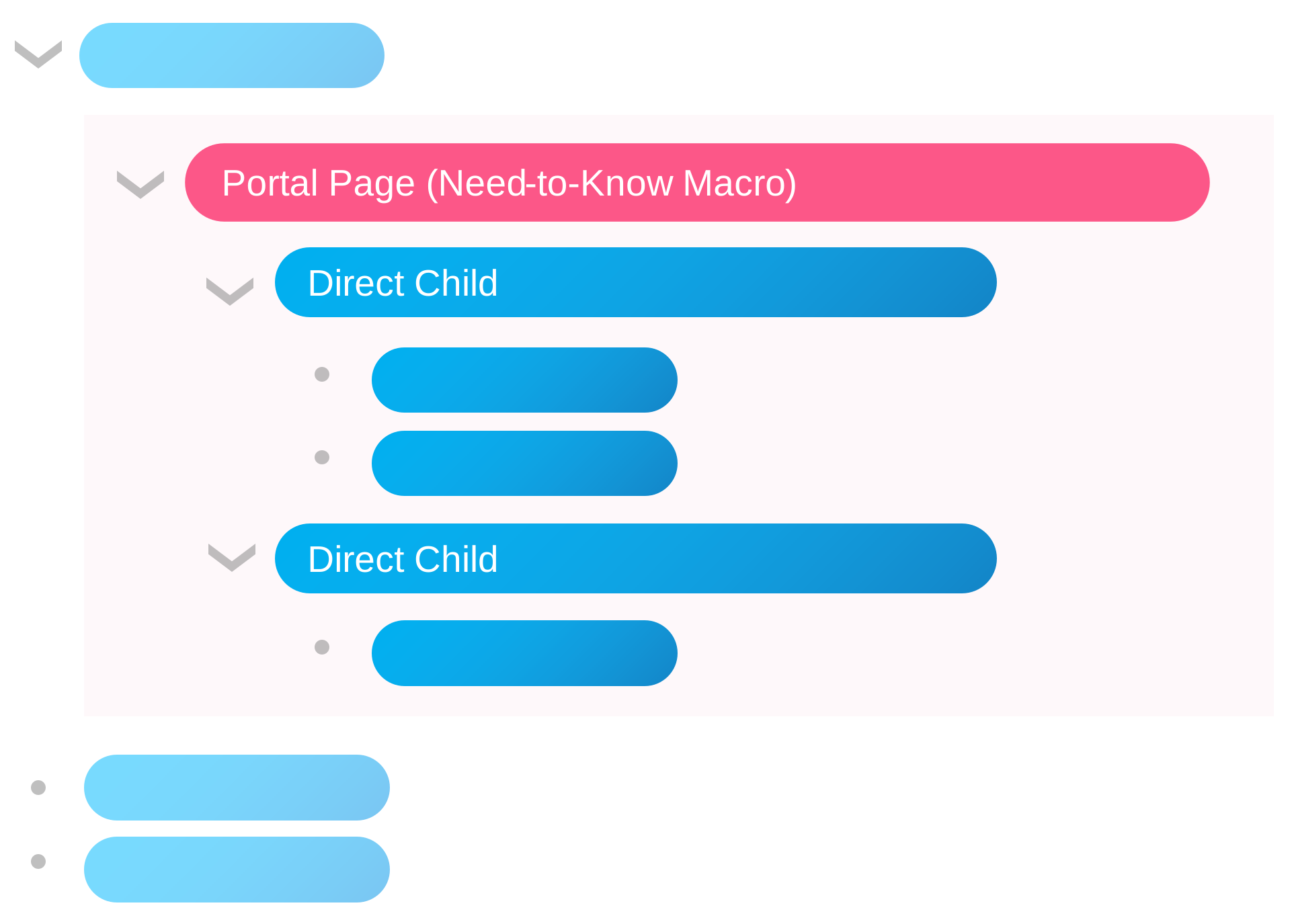
A page hierarchy, each horizontal bar being a page. The Need-to-Know macro has been placed at the top of the sub-hierarchy that needs the need-to-know principle applied to.
The portal monitors access to all descendant content (pages, whiteboards, databases, etc.; any level below the portal page) and will remove access for users who didn’t view any content for a configured time period.
You define the permission baseline for the portal by restricting access to the portal page. Use the Confluence way of doing this. Set restrictions for users and groups that should be able to access all descendant pages. Usually, this is a group of people like a project team or a department.
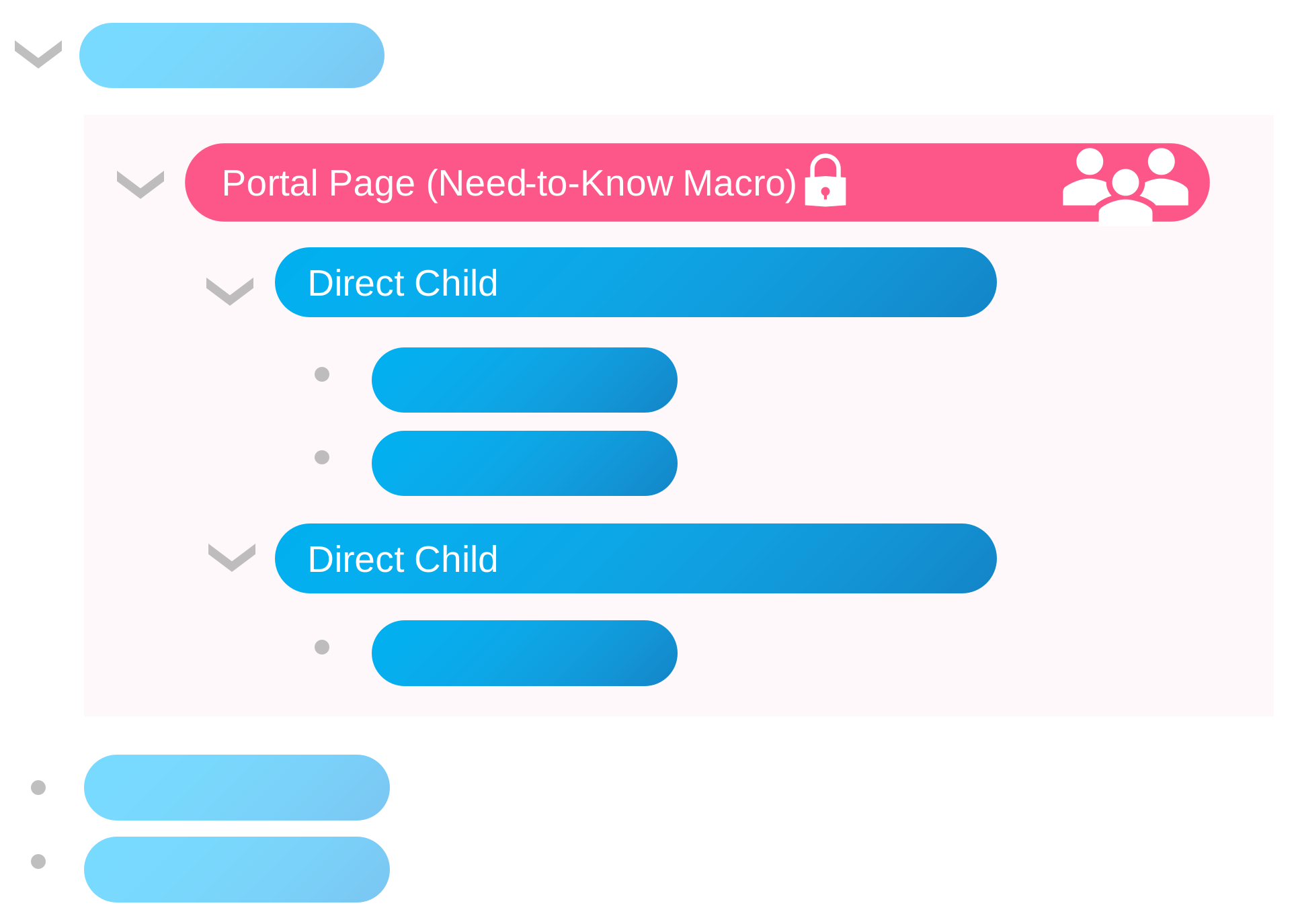
Restrictions on the portal page define the permission baseline for the Need-to-Know portal.
Activate the portal and the Need-to-Know Portal will start adopting direct children to manage their restrictions.
To be able to remove user access to descendants of the portal page, the Need-to-Know app copies the portal’s restrictions to all direct children and starts managing them. It makes one adjustment while copying the restrictions to direct children: all groups will be flattened, only single user accounts will be added to the children’s restrictions.
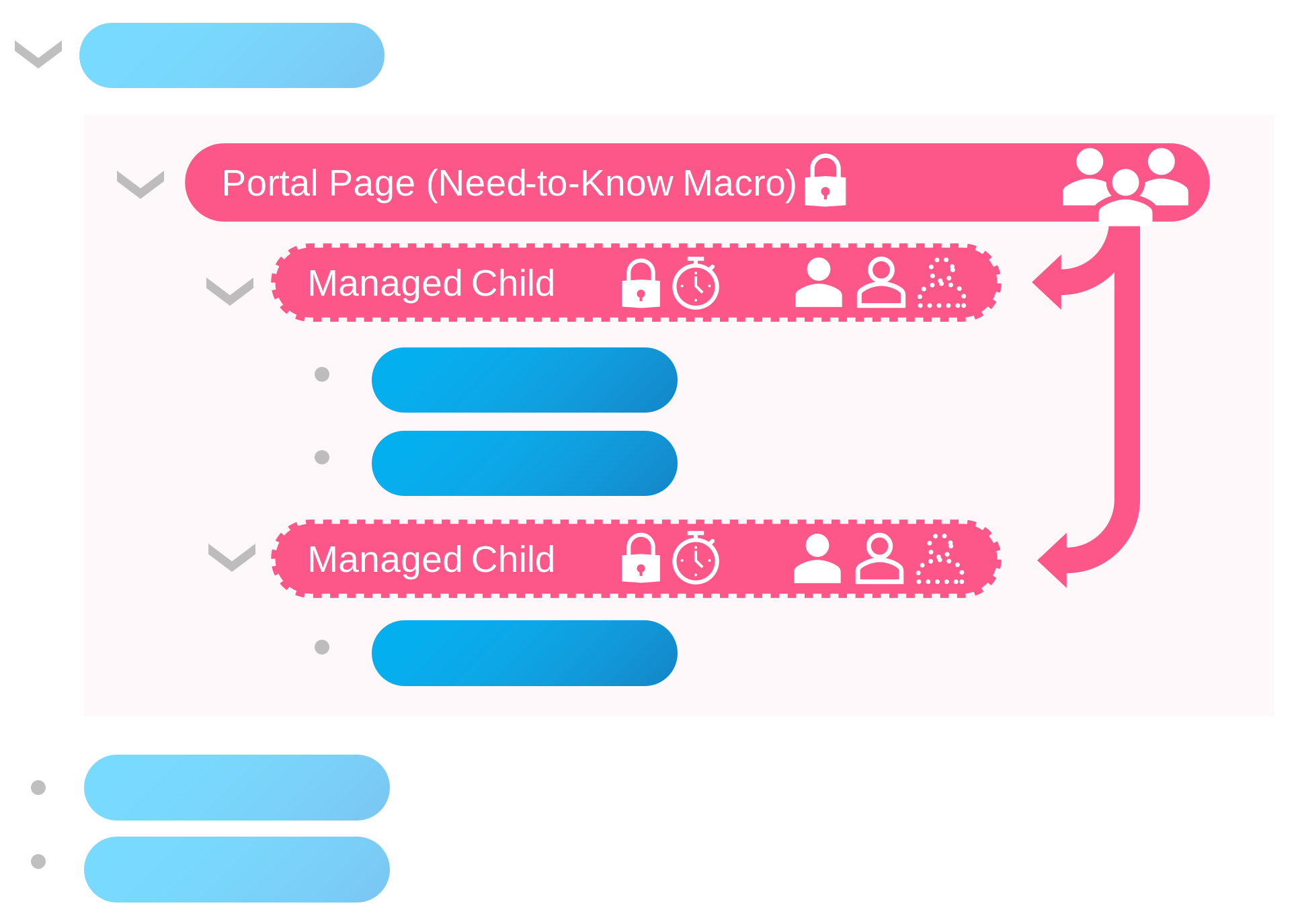
The Need-to-Know portal adopts direct child pages, managing their restrictions from then on. Users that don't access descendants for a set time span will be automatically removed from the restrictions list, losing access.
Let’s say you restrict access to the portal to user groups awr-aero-viewers and awr-lead-engineers, where those groups have 10 members each. After applying the portal’s restrictions to direct children, the restriction setting for those will show 20 user accounts (plus the portal admins and the app account).
With those single user restrictions applied, the portal can remove the access for single user accounts by simply removing them from the restrictions of direct children.
Notes
The portal will never change the restrictions of its portal page because this is the permission baseline you set.
If not-yet-adopted direct children of a portal page already have restrictions set, the portal will ignore those children.
Once a portal has adopted a child page, it will manage its restrictions. When the restrictions of adopted direct children are changed, the portal might reset them.
The portal can never widen the restrictions of descendant pages beyond the baseline that is defined via the portal page. This is how Confluence restrictions work. Going deeper down the page tree, you can narrow the restrictions, but you can not widen them.
Limitations
The portal supports up to 100 users as permission baseline. This is the sum of all single user accounts and accounts from all user groups that you set as restrictions for the portal page.
When group members are added to groups which define a portal permission baseline, the app won’t recognize this group member change and the new members won’t be able to access the portal right away. The Atlassian Forge platform doesn’t provide a “group changed” event to listen to. Portal admins have to click the Update Now button to apply the added group members to managed child content. Note that removing users from a group will take effect immediately, as this is enforced by the portal page’s restrictions.
Guest users are currently not supported as those are not supported by the Atlassian Forge platform. Atlassian is working on enabling that scenario.
1.3 - Privacy Policy - Need-to-Know for Confluence
This article explains what data is processed, for which purposes, how long it is stored, and which rights data subjects have.
Last updated: 2025-12-05
1. Scope
This privacy policy describes how the Atlassian Cloud app Need-to-Know for Confluence ("the app") processes personal data when installed into a Confluence Cloud site. It supplements Atlassian's own privacy notice and applies only to processing performed by this app on behalf of the Atlassian customer who installs it.
2. Roles
- Confluence customer (your organization) - decides whether to install the app and how to configure it. For most users, your organization acts as controller.
- App vendor (Wiki Transformation Project - Heinrich Ulbricht) - provides and maintains the app. The app runs on Atlassian's Forge platform and uses Forge storage; we do not run a separate production backend for this app.
- Atlassian - operates Confluence Cloud and Forge under its own terms and privacy notice.
The app does not transfer any data from your Confluence site to third parties. All processing and storage occurs within Atlassian's Forge platform.
3. What the app does
The app implements a "need-to-know" model for Confluence content. You configure a portal page as a baseline for access. The app then:
- Tracks which users access content that is associated with a portal.
- Aggregates per-portal, per-user last-access information.
- Removes access from portal-managed child pages when users have been inactive longer than a configured period.
- Provides dashboards and exports so portal and product administrators can understand and audit access decisions.
4. Categories of data processed
4.1 User-related data
- Atlassian account ID (for example
accountId) of users who access portal pages or portal-managed content. - Portal administrator account IDs (
portalAdmin1,portalAdmin2) configured for each portal. - Display name of users, resolved via Confluence Cloud APIs to show human-readable names in access overviews. Display names are not stored permanently in app storage; they are resolved when needed and sent to the UI or CSV exports.
4.2 Content and portal identifiers
- Content IDs and types for Confluence content (pages, blog posts and other supported types) that is associated with a portal.
- Portal identifiers and keys used by the app to group configuration, events and portal-managed pages.
- Portal-managed page mappings that record which content items have been explicitly adopted by a portal.
The app does not store page bodies or comments in its own storage. It interacts with Confluence's restriction model via the REST APIs.
4.3 Usage events
When Confluence content is viewed in your site, the app records usage events in Forge storage for aggregation. Each event contains:
- User account ID.
- Content ID and type.
- An event type (for example a view event) and a source indicator.
- A timestamp indicating when the event occurred.
These events are used only to derive last-access times and portal usage metrics.
4.4 Aggregated portal access per user
On a scheduled basis the app aggregates usage events into per-portal, per-user access records stored in the app's data storage on Atlassian Forge. For each portal and user, this record may contain:
- Portal key.
- User account ID.
- Last access timestamp.
- Calculation timestamp indicating when the record was last updated.
- An access record type (for example measured, added, removed).
- Aggregated daily and monthly usage buckets that indicate on how many days or in how many months there was recorded access.
This aggregated data powers the portal access overview and the access removal logic.
4.5 Portal configuration and state
The app stores configuration and state in additional Forge entities, including:
- Portal configuration (portal key, portal content ID, portal administrator account IDs, enabled flag, and inactivity window in seconds).
- Portal mappings between content IDs and portals, including whether a page is currently portal-managed.
- Portal state such as last access removal timestamps and account count metrics.
- Job metadata describing background jobs (job type, status, timestamps and short error messages).
These data contain only the minimum personal data required (primarily account IDs).
4.6 Debug tools and CSV exports
Confluence product administrators can use optional debug tools to download recent events and aggregated portal access data as CSV files. The app sends the requested data to the administrator's browser session, where the CSV is created and downloaded. The resulting files are under the control of your organization. The app vendor does not receive copies of these exports.
5. Purposes of processing
The app processes personal data for the following purposes:
- Applying the need-to-know principle to Confluence content by removing access for users who have not accessed portal-managed content within the configured inactivity window.
- Providing transparency to portal and product administrators via dashboards, overviews and exports that show who currently has access and when they last accessed portal-managed content.
- Operating and monitoring the app, including running background jobs, logging errors and supporting troubleshooting.
The app does not use data for advertising, marketing, or profiling unrelated to access management.
6. Legal basis (GDPR)
Where the EU General Data Protection Regulation (GDPR) applies, processing by the app is typically based on Art. 6(1)(f) GDPR - legitimate interests. Your organization has a legitimate interest in:
- Ensuring that access to Confluence content is limited to those who still need it.
- Reducing the risk of excessive or stale access rights.
- Being able to audit and explain access removal decisions.
The app is designed to work primarily with pseudonymous account identifiers and to minimize any additional personal data.
7. Retention periods
- Usage events used for aggregation are retained for 60 days and then deleted by a scheduled deletion job.
- Aggregated portal access records are retained while the related portal exists. When a portal is deleted, all aggregated portal access records for that portal are deleted by a background job. Confluence product administrators can also clear all aggregated portal access records using the app's debug tools.
- Portal configuration, state and mappings persist while a portal exists. When a portal is deleted, associated configuration, mappings, aggregated access records and state are removed by background jobs.
- Logs and job metadata are retained within Atlassian's Forge logging and storage facilities for operational and troubleshooting purposes and are subject to Atlassian's platform retention rules.
- CSV exports created via the debug tools are stored only where the downloading administrator chooses to save them and are subject to your own retention policies.
8. Data sharing and international transfers
The app runs entirely on Atlassian's cloud infrastructure. Forge storage and processing are operated by Atlassian and may involve international data transfers as described in Atlassian's own documentation. The app vendor does not operate a separate production backend for this app and does not intentionally transfer personal data to additional third parties.
Your organization may further process CSV exports or other data outside Confluence according to its own policies. Such processing is under your control and outside the app vendor's responsibility.
9. Security
The app follows Atlassian Forge security concepts:
- Access to Confluence data is limited to the scopes declared in the app manifest (for example read access to content details and users and app storage).
- Backend processing uses Forge functions and key-value storage provided by Atlassian.
- Access to portal access data and debug tools in the UI is restricted to portal administrators and, for debug tools, to Confluence product administrators.
Your organization remains responsible for configuring Confluence permissions, managing administrator accounts, and securing devices where CSV exports are stored.
10. Data subject rights
Where GDPR or similar laws apply, data subjects generally have rights of access, rectification, erasure, restriction of processing, objection and data portability under the conditions set out in the law. Because the app operates inside your Confluence Cloud site, requests from end users should normally be directed to your organization as the primary controller.
We support your organization in fulfilling data subject requests by:
- Using Atlassian account IDs that are consistent with Confluence's own identifiers.
- Providing Confluence product administrators with tools to inspect and clear stored portal access data.
11. Automated decision-making
The app includes automated processing that can affect user access:
- A scheduled access removal job automatically removes access from portal-managed pages for users who have been inactive longer than the configured inactivity window. This decision is based solely on the last recorded access timestamp compared to the portal's inactivity threshold.
Portal administrators can review which users are approaching removal in the app's access overview before the removal takes effect. Users whose access has been removed can request re-access through your organization's normal processes.
12. Children's privacy
The app is intended for use by organizations managing Confluence content for their employees, contractors and collaborators. It is not intended for use by children under 16 years of age. We do not knowingly collect personal data from children.
13. Changes to this policy
We may update this privacy policy from time to time to reflect changes in our practices or for legal, operational or regulatory reasons. When we make material changes, we will update the "Last updated" date at the top of this policy. We encourage you to review this policy periodically. The current version of this policy is always available on the app's Atlassian Marketplace listing or the StaticTrail website.
14. Contact
If you have questions about this privacy policy or about how the Need-to-Know for Confluence app processes personal data, please use the contact options provided on the app's Atlassian Marketplace listing or under the website's Contact menu option available at Contact.